Topics

- iPads, Tablets, Boardrooms and Apps

- Apps We Recommend

- “Where do I put the camera in a videoconference room?” and “How high do I mount the monitors?

iPads, Tablets, Boardrooms and Apps
It was mid 2010 when CMS issued iPads to our staff. At that time chances were that we were one of the few – if any – using them at a meeting. Fast forward to the present and it is likely the majority is now making use of the tool. It has gained wide acceptance – from the CEO – and thankfully the CIOs – to the AV techie – and is now a common and useful tool. User applications for high level executives like “BoardBooks” have provided even more impetus for acceptance.


At CMS we dived into the iPad waters hoping to provide a tool to our staff to streamline collaboration, increase efficiency and help organize day to day tasks. We also anticipated the value of the tool in the AV experience. Undoubtedly it’s been a great success.

The tips here are purely what has worked (or not worked) for us. It is important to note that whether iPad or tablet (we have Android based as well, although the iPad is still the favorite) the advent of the tool has changed what we do. It has changed the client’s experience, expectations and diminished the intimidation factor of AV technology. For the true AV professional it is vital that we embrace it more each day.


Apps We Recommend
These are just a few of the apps that we use the most and have proved effective. Of course email and calendar have been used from the beginning. We will add more as we test and prove they work in the long term.

Daily Notes
A project “notebook”. Easy to use. Replaces the paper notebook. The file tab for each project and calendar work well together.
iAnnotate
Annotating PDFs is something all of us do all day long. We have tried many similar apps. This one works well, the filing system is easy to read and you can project to a display when using the original iPad (not an issue with iPad2).

GoTo and WebEx
Attend a web meeting from a taxi? Enough said. Anywhere, anytime – it works. The only downside is that the current versions do not support a tablet user as a presenter – only a participant.
VideoCalc
Aspect ratio calculations, conversions, screen diagonal calculations, luminance calculations etc.
Sketchbook Express
A basic sketch pad that also allows you to annotate photos. Great when sending field site photos in status reports or RFIs.
AudioTools by StudioSix
This is great stuff. Good for checking levels for sound systems or plotting ambient noise curves in those problem spaces. Also use it for RT60 calcs. Adding the optional modules gets pricey but well worth it.


Feel free to contact us with any questions on how we use our pads – mschuch@cmsav.com


“Where do I put the camera in a videoconference room?” and “How high do I mount the monitors?”
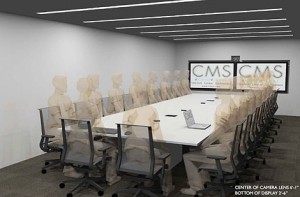
Misplacing either is a very common mistake. Finally there is a complete review of the variables in making the decision. We also explore the impact on the design of the space and the user experience.

If you would like to view the presentation of the research please contact Michael Schuch at mschuch@cmsav.com